Leave Breathing Room When Removing Gaps in Riverside

When you shorten or remove gaps in Riverside's editor, it's tempting to trim them down to nothing — cutting right where one word ends and the next begins - or maybe the AI does that with the automated gap removal tool. The result sounds robotic. Words slam into each other with no space to breathe, and the video cuts look jerky too.
A small change in approach fixes this: leave a buffer zone on each side of the gap.
What the Buffer Looks Like
In the Riverside timeline, a removed gap shows as a shaded section between two waveform segments. Each segment represents a word or phrase. When you look at the gap between them, you can see where one word's audio ends and where the next word's audio begins.
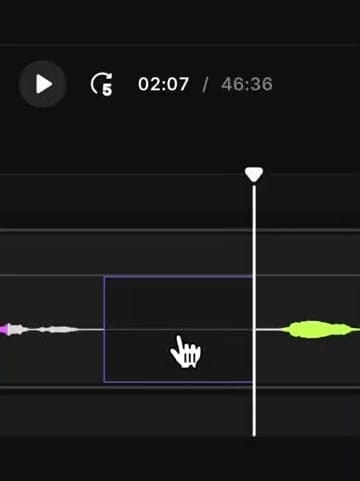
If you drag this gap all the way to zero, the two waveforms butt up against each other. The speaker will sound like they never paused, even briefly.
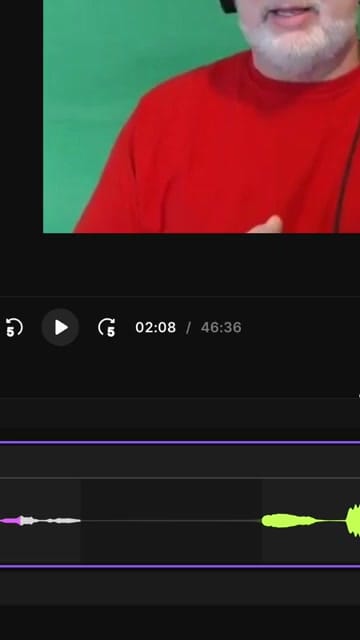
Leave a Sliver
Instead of closing the gap entirely, leave a small amount of silence before the next word starts. You don't need much — just enough that the previous word finishes, there's a brief pause, and the next word begins naturally.
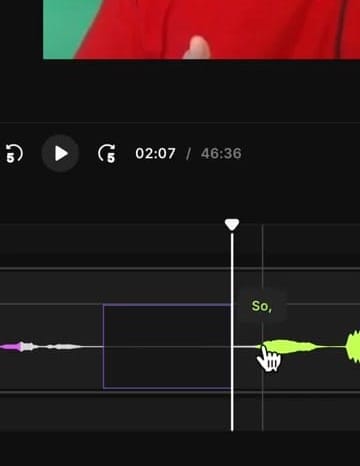
Play it back. The speaker should sound like they're speaking with a normal rhythm, not like words were glued together in post.
Why It Matters
Zero-gap cuts create two problems: the audio sounds rushed and unnatural, and the video transitions feel abrupt. A small buffer solves both. The listener won't consciously notice the pauses — they'll just hear natural-sounding speech.
If you’re eager to learn more about Riverside and wish to have a one-on-one Riverside coaching session, feel free to book a call with me.
I’m here to help you with any questions you have and to guide you through the best workflows, tips, workarounds, or just answer any questions you may have!