Reorder Tools in Camtasia

Did you know you can rearrange the tools in Camtasia's left sidebar? If there are panels you use more than others, you can drag them to the top so they're always within easy reach. Here's how.
The Default Tool Order
Camtasia ships with a set order of tools in the left sidebar: Favorites, Media, Annotations, Transitions, Visual Effects, Animations, Behaviors, Cursor Effects, Audio Effects, Voice Narration, Gesture Effects, and Captions.
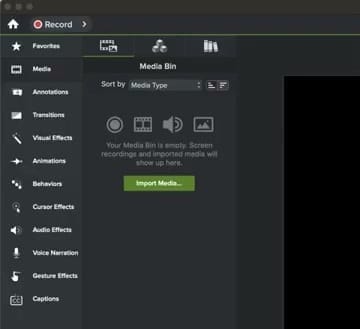
Drag to Reorder
To move a tool, simply click and drag it to a new position in the sidebar. Grab any tool name and drag it up or down to where you want it.
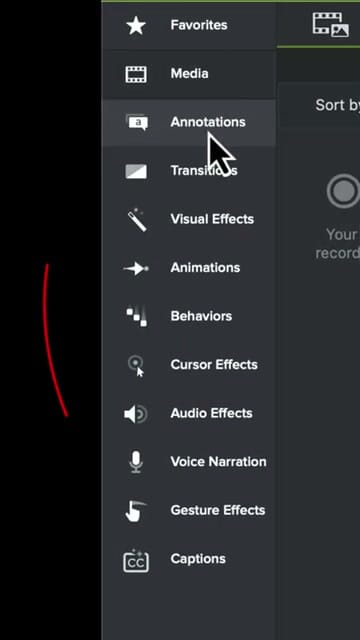
As you drag, you'll see the tool move with your cursor. Drop it in the new position and it stays there.
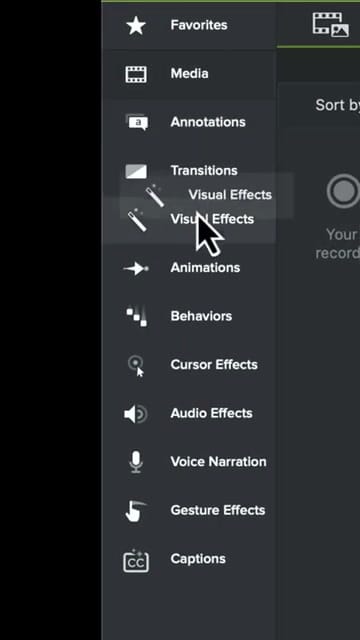
Your Custom Layout
Once you drop the tool, the sidebar updates immediately. Camtasia remembers your custom order, so it persists across sessions.
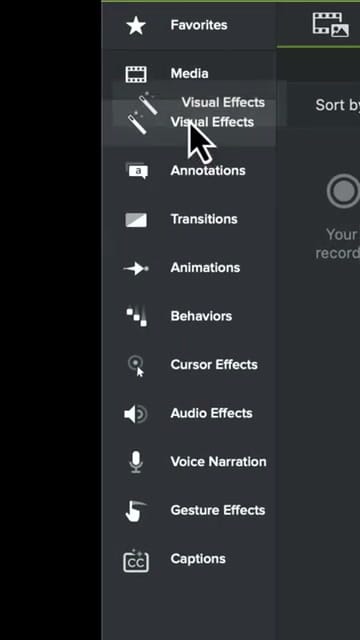
Why Reorder?
- Speed up your workflow — Put your most-used tools at the top so you spend less time scrolling
- Personalize your workspace — Everyone edits differently, so arrange tools to match how you work
- Group related tools — Place tools you use together (like Visual Effects and Annotations) next to each other
It's a small customization, but it makes a noticeable difference when you're editing in Camtasia every day.
If you’re wish to learn more about Camtasia and wish to have a one-on-one Camtasia coaching session, feel free to book a call with me.
I’m here to help you with any questions you have and to guide you through the best workflows, tips, workarounds, or just answer any questions you may have!